Five Reasons to Get New Hardware in 2010

Five Reasons to Get New Hardware in 2010
The year may be wrapping up but computer sales are on the rise. People are looking for new, innovative technology for a number of reasons. If you have been thinking about buying a new computer or upgrading your old one, there is no better time than 2010! Whether you are looking to save money or for better quality, or anything in between, here are a few quick reasons why you should refresh your computer hardware in the new year:
  • Make Life Easier - The newly released Windows 7 Professional has a number of features such as Quicklook 3 and Quickweb which allow you to access your personal information online or on your PC without even having to boot up!
  • Save Time - Newer computers boasting Windows 7 and Intel Core 2 Duo processors run much faster than your old one. Some can run up to three times as fast! Even laptops have large increased power performances with new technology.
  • Save Money - In an age where everyone is working to be "green" and save energy, many new computers operate using less power than the old ones. Hewlett Packard says their new desktops consume up to 55% more energy than the older ones! That means lot of savings on your power bill.
  • Less Downtime - Everyone who owns an older computer knows they spend way too much time dealing with downtime. Whether youre having to call in a computer technician for repairs or rebooting or scanning files for problems, it seems like something goes wrong almost weekly. Newer computers have less problems and in turn, will allow you to be more productive.
  • Special Offers - So many computer companies offer special deals when you buy a computer, you really have nothing to lose and this will only add to your new computers value. For example, at Hewlett Packard, you receive over $1,000 in free offers when your purchase a new PC and if you trade in an old computer, you can get up to $100 in cash from the companys Trade-In Program.


    Looking for Computer / PC Rental information? Visit the www.rentacomputer.com PC Rental page for your short term business PC needs. Or see this link for a complete line of Personal Computer Rentals.
Read More..

Apples iPad Outsells HPs PCs in Q1 2012

iPadsIts no surprise that Apple is one of the top PC and technology makers in the world. What may be surprising is the fact that Apple has surpassed HP in computer unit sales and revenues for the first time ever, making the Cupertino giant the number one company. Apple can attribute a lot of this success to record sales of iPads and, instead of losing sales to low priced tablets, Apple said that it would continue to "innovate like crazy" in the tablet market.

The company reported quarterly sales of 15.4 million iPads and 5.2 million Macs, which gave Apple more than 20 million sales of dedicated computing devices. It was reported that HPs sales for the fourth quarter of 2011 were close to 14.7 million, with Lenovo and Dell selling 12.9 million and 11.6 million units, respectively. In addition to that, Apples figures were twice that of those reported by Microsoft for the same quarter.

Tim Cook, the new CEO of Apple, was asked about the impact of lower-priced tablets in the market, like Amazons Kindle Fire. Cook replied that he was happy with the iPads sales and pointed out that sell-through had exceeded sell-in, which left the company with strained inventory levels around the world, contradicting the rumors that the Kindle Fire had dampened potential iPad sales. Cook also stated that Apple sees the iPad as a "huge opportunity for Apple over time" and that "there will come a day when the tablet market in units is larger than the PC market."

Tablets are indeed doing very well with almost every name in the tech world offering their own version of the iPad which pioneered the market. However, I dont think that tablets will ever fully replace computers or laptops. Physical keyboards and mouse controls are too ingrained in people and are also extremely necessary for a lot of computing tasks. Sure you can make keyboard docks and mouse attachments, but whats the point?

Cook also pointed out that the rapid growth of iPad sales was eating up the growth of generic PC sales but not hurting the Apples own Mac sales. It seems that all of Apples mobile tech gadgets draw in customers for the companys netbooks and desktop computers. Sales of both have been up, and over 1/5 of all Apple Mac sales were through the companys own retail stores.

Source: Apple Insider - Apple now largest computer maker, sold more iPads alone than HP sold PCs
Slash Gear - Apple sold more iPads than HP sold PCs in Q1 2012

Power Point Projectors
Most business class projectors will do a good job displaying your PowerPoint presentation. If you have a small presentation group, a 2000 lumen LCD projector will be able to produce a nice and clear picture. For larger audiences you should consider a 5000 lumen LCD projector.
Read More..

RECHARGEABLE PORTABLE SPEAKER BUILT IN SUITABLE


RECHARGEABLE PORTABLE SPEAKER BUILT IN SUITABLE


RECHARGEABLE PORTABLE SPEAKER BUILT IN SUITABLE is one of the bestseller product in the market today. People arround United Kingdom is looking for RECHARGEABLE PORTABLE SPEAKER BUILT IN SUITABLE with low prices from Internet. If youre lucky you can get a special discount from Amazon, only in this month. Well, good product that comes with low prices is everyone choices.

On sale now at affordable price, special discounts and super shipping. I am extremely pleased with their qualities and highly recommend it to anyone searching for a excellent item with the newest specifications at an cheap. You can read review from buyers to find out more through their experience. RECHARGEABLE PORTABLE SPEAKER BUILT IN SUITABLE has worked beneficial for me and I believe it would do wonders on you too. So why spend any more time? Enjoy yourself, you know where to shop the best ones.

Some of the customer reviews speak that the RECHARGEABLE PORTABLE SPEAKER BUILT IN SUITABLE are splendid luggage. Also, It Is a pretty well product for the price. It’s great for colony on a tight budget. We’ve found pros and cons on this type of product. But overall, It’s a supreme product and we are well recommend it! When you however want to know more details on this product, so read the reports of those who have already used it.


RECHARGEABLE PORTABLE SPEAKER BUILT IN SUITABLE is a good choice with brand new features that will make you amaze. But if you still want to have another information about RECHARGEABLE PORTABLE SPEAKER BUILT IN SUITABLE, you can read more detail information, spesification, and reviews from people that bought RECHARGEABLE PORTABLE SPEAKER BUILT IN SUITABLE below.

RECHARGEABLE PORTABLE SPEAKER BUILT IN SUITABLE Detail Information :


This Page is a participant in the Amazon Services LLC Associates Program, an affiliate advertising program designed to provide a means for sites to earn advertising fees by advertising and linking to Amazon.co.uk
CERTAIN CONTENT THAT APPEARS ON THIS SITE COMES FROM AMAZON SERVICES LLC. THIS CONTENT IS PROVIDED "AS IS" AND IS SUBJECT TO CHANGE OR REMOVAL AT ANY TIME.

Read More..

RECHARGEABLE PORTABLE BUILT IN EEARPHONE FUNCTION


RECHARGEABLE PORTABLE BUILT IN EEARPHONE FUNCTION


RECHARGEABLE PORTABLE BUILT IN EEARPHONE FUNCTION is one of the bestseller product in the market today. People arround United Kingdom is looking for RECHARGEABLE PORTABLE BUILT IN EEARPHONE FUNCTION with low prices from Internet. If youre lucky you can get a special discount from Amazon, only in this month. Well, good product that comes with low prices is everyone choices.

Available now at affordable price, promo discounts and easy shipping. I am really happy with the features and highly recommend it to anyone hunting for a top quality item with the newest specifications at an cheap. You can read review from customers to find out more from their experience. RECHARGEABLE PORTABLE BUILT IN EEARPHONE FUNCTION has worked beneficial for me and I wish it would do wonders on you too. Why then waste any more time? Have Fun, you understand where you can purchase the best ones.

Some people reviews speak that the RECHARGEABLE PORTABLE BUILT IN EEARPHONE FUNCTION are splendid luggage. Also, It Is a pretty well product for the price. It’s great for colony on a tight budget. We’ve found pros and cons on this type of product. But overall, It’s a supreme product and we are well recommend it! When you however want to know more details on this product, so read the reports of those who have already used it.


RECHARGEABLE PORTABLE BUILT IN EEARPHONE FUNCTION is a good choice with brand new features that will make you amaze. But if you still want to have another information about RECHARGEABLE PORTABLE BUILT IN EEARPHONE FUNCTION, you can read more detail information, spesification, and reviews from people that bought RECHARGEABLE PORTABLE BUILT IN EEARPHONE FUNCTION below.

RECHARGEABLE PORTABLE BUILT IN EEARPHONE FUNCTION Detail Information :


This Page is a participant in the Amazon Services LLC Associates Program, an affiliate advertising program designed to provide a means for sites to earn advertising fees by advertising and linking to Amazon.co.uk
CERTAIN CONTENT THAT APPEARS ON THIS SITE COMES FROM AMAZON SERVICES LLC. THIS CONTENT IS PROVIDED "AS IS" AND IS SUBJECT TO CHANGE OR REMOVAL AT ANY TIME.

Read More..

DESKTOP RECHARGEABLE PORTABLE BUILT IN SUITABLE


DESKTOP RECHARGEABLE PORTABLE BUILT IN SUITABLE


DESKTOP RECHARGEABLE PORTABLE BUILT IN SUITABLE is one of the bestseller product in the market today. People arround United Kingdom is looking for DESKTOP RECHARGEABLE PORTABLE BUILT IN SUITABLE with low prices from Internet. If youre lucky you can get a special discount from Amazon, only in this month. Well, good product that comes with low prices is everyone choices.

On sale now at cheap price, special discounts and fast shipping. Im very happy with the features and highly recommend it to anyone hunting for a excellent item with the newest specifications at an reasonable. You can read testimony from customers to find out more through their experience. DESKTOP RECHARGEABLE PORTABLE BUILT IN SUITABLE has worked wonders for me and I wish it will do wonders on you too. Why then spend much more time? Enjoy it, you know where to purchase the best ones.

Most people reviews speak that the DESKTOP RECHARGEABLE PORTABLE BUILT IN SUITABLE are splendid luggage. Also, It Is a pretty well product for the price. It’s great for colony on a tight budget. We’ve found pros and cons on this type of product. But overall, It’s a supreme product and we are well recommend it! When you however want to know more details on this product, so read the reports of those who have already used it.


DESKTOP RECHARGEABLE PORTABLE BUILT IN SUITABLE is a good choice with brand new features that will make you amaze. But if you still want to have another information about DESKTOP RECHARGEABLE PORTABLE BUILT IN SUITABLE, you can read more detail information, spesification, and reviews from people that bought DESKTOP RECHARGEABLE PORTABLE BUILT IN SUITABLE below.

DESKTOP RECHARGEABLE PORTABLE BUILT IN SUITABLE Detail Information :


This Page is a participant in the Amazon Services LLC Associates Program, an affiliate advertising program designed to provide a means for sites to earn advertising fees by advertising and linking to Amazon.co.uk
CERTAIN CONTENT THAT APPEARS ON THIS SITE COMES FROM AMAZON SERVICES LLC. THIS CONTENT IS PROVIDED "AS IS" AND IS SUBJECT TO CHANGE OR REMOVAL AT ANY TIME.

Read More..

RECHARGEABLE PORTABLE BUILT IN EEARPHONE FUNCTION


RECHARGEABLE PORTABLE BUILT IN EEARPHONE FUNCTION


RECHARGEABLE PORTABLE BUILT IN EEARPHONE FUNCTION is one of the bestseller product in the market today. People arround United Kingdom is looking for RECHARGEABLE PORTABLE BUILT IN EEARPHONE FUNCTION with low prices from Internet. If youre lucky you can get a special discount from Amazon, only in this month. Well, good product that comes with low prices is everyone choices.

Available now at cheap price, promo discounts and easy shipping. Im very pleased with the features and highly recommend it to all people needing for a top quality product with the newest specifications at an low. You can read testimony from buyers to find out more through their experience. RECHARGEABLE PORTABLE BUILT IN EEARPHONE FUNCTION has worked beneficial for me and I believe it will do wonders on you too. So why waste any more time? Enjoy it, you know where to shop the best ones.

Most people reviews speak that the RECHARGEABLE PORTABLE BUILT IN EEARPHONE FUNCTION are splendid luggage. Also, It Is a pretty well product for the price. It’s great for colony on a tight budget. We’ve found pros and cons on this type of product. But overall, It’s a supreme product and we are well recommend it! When you however want to know more details on this product, so read the reports of those who have already used it.


RECHARGEABLE PORTABLE BUILT IN EEARPHONE FUNCTION is a good choice with brand new features that will make you amaze. But if you still want to have another information about RECHARGEABLE PORTABLE BUILT IN EEARPHONE FUNCTION, you can read more detail information, spesification, and reviews from people that bought RECHARGEABLE PORTABLE BUILT IN EEARPHONE FUNCTION below.

RECHARGEABLE PORTABLE BUILT IN EEARPHONE FUNCTION Detail Information :


This Page is a participant in the Amazon Services LLC Associates Program, an affiliate advertising program designed to provide a means for sites to earn advertising fees by advertising and linking to Amazon.co.uk
CERTAIN CONTENT THAT APPEARS ON THIS SITE COMES FROM AMAZON SERVICES LLC. THIS CONTENT IS PROVIDED "AS IS" AND IS SUBJECT TO CHANGE OR REMOVAL AT ANY TIME.

Read More..

How to Enable jQuery Intellisense in Visual Studio 2010

How to Do That ?

There are 2 ways to do that.

Method 1 :

When you are working with Local copy of js files,Then you have to set up jquery-1.5.1-vsdoc.js file as below.(This is my js file version.It supports These versions )

Local copy of js files

Then on Master Page Set Script Tags like below.
<head>
<script src="@Url.Content("~/Scripts/jquery-1.5.1.min.js")" type="text/javascript"></script>
</head>

After that on Child Pages you can have Jquery Intellisense on each level of your code as below.

Jquery Intellisense


Method 2 :

If you are referring js files from CDN (Content Delivery Network) then add vsdoc.js file into your Scripts folder  like below.

CDN (Content Delivery Network)

Your Master Page should looks like below.
                                      with  Microsoft CDN 
<head>
<script src="http://ajax.aspnetcdn.com/ajax/jquery/jquery-1.7.1.min.js" type="text/javascript">
</script>
</head>
                                       with Google CDN

<head>
<script src="http://ajax.googleapis.com/ajax/libs/jquery/1.7.1/jquery.min.js" type="text/javascript">
</script>
</head>


Note : If you set up vsdoc.js file as above then it works with both CDN.

Conclusion

By using above methods you can use jQuery Intellisense with VS 2010.One Very Important thing you have to remember here is both your .min.js file and .vsdoc.js files Versions Must be the Same.Otherwise some wrong Intellisense information may appear for Jquery functions.

Happy Coding.

May Be Use Full To You :
How to Disable a Button Using Jquery and CSS ?
How to Convert Linq Entity Query into T-SQL ?
How to Improve Performance of Entity Framework Query (over 400 times)?

Read More..

Whats New in AutoCAD 2011 In Detail Part 1

AutoCAD 2011 is out and it has been given several updates.  It seems that recent new AutoCAD releases have had, generally speaking, two major new features added to it.  AutoCAD 2010 had mesh modeling and parametric constraints added to it.  AutoCAD 2009 had the Ribbon and the Action Recorder, though, the Action Recorder has a lot of potential, many users consider it a bust (I don’t, I think it’s great).  Perhaps the same goes for the ribbon as well.  Face it, CAD users don’t like change.  Every release with a major change has had more than its fair share of gripes and groans.

AutoCAD 2011 has two major updates, surface modeling, and a culmination of document tools.  There really isn’t one major new documentation feature (except maybe the transparency setting that is now available,) but instead there are several additions and tweaks that separately are weak, but together make AutoCAD 2011 the best AutoCAD yet!


This is the first article in a series that will closely look at the new features.  I don’t want to give a list of what’s new, but instead, I want to go in-depth and show you each new enhancement.  Some of the articles will cover one new item while others will look at several.  Some new features may even span more than one article.  If you haven’t installed your copy of AutoCAD 2011 yet, do so now.  As a CAD user of over 17 years, this latest release really has me smiling.  Yes I’m an AutoCAD fanboy, but just wait.  Even if you aren’t into the heavy features of AutoCAD (then shame on you for not using the tools you have paid for) you are still going to love the “little things” that are in AutoCAD 2011.

AutoCAD 2011 background & grid are different

Let’s get started.  One of the very first things you may notice in AutoCAD 2011 is the background color.  Yet again Autodesk has seen it fit to change the color, though this time it is more subtle.  It is now a dark gray.  I don’t know why they insist on changing it almost every release, but they do.  It’s ok really, because it is easy enough to change to whatever color you want.  I have a post (click here) that describes the process.  The post is for AutoCAD 2009, but the process is the same for AutoCAD 2011.

Another thing you are going to notice is that there is an actual grid when you turn the grid display feature on!  Out of the box it is on.  Also notice the UCS Icon, it too looks different.  No more cones at the ends, just lines, one for the X Axis and one for the Y Axis.  The grid is colored green on the Y Axis and red on the X Axis.  This is nice because it helps them to stand out, I guess.  This makes the background look more like old fashioned graph paper.  Funny how over the years there have been more and more items in AutoCAD to make its drawings look more “hand drawn” than before.

And since we are on the UCS Icon, the 3D Gizmos have been tweaked a bit too.  Each one is a bit more distinct so that it is easier to tell them apart.  They are also more consistent with their functions.  The axis colors match the UCS icon, and each gizmo looks much more different from the others.  They are still easy to use, go to the Ribbon (in the 3D Modeling Workspace), Home Tab, Subobject Panel.  Expand it, and go to the Gizmo Command.  Select which Gizmo you want to use, now select a 3D object.  The gizmo you picked should pop up.  If not, select the object first, then pick the Gizmo.  Keep the object selected, now pick a different Gizmo, it changes.  If you need to switch between Gizmos, it’s easy.  Just pick the one you want.
The 3D Gizmos


One more highly visible change is in the navigation tools.  By default, there is now a Navigation Bar tool.  This bar has some of the most frequently used navigation tools in it.  It has:  Steering Wheel, View Cube, ShowMotion, Pan, Zoom, and Orbit.  These items used to be in the status bar; they aren’t anymore.  You can turn the navigation bar off and on if it gets in your way.  You can dock the Navigation Bar on the top, bottom, left or right side of the drawing window.  You can also control what navigation tools are displayed.  To change the nav bar, click on the arrow at the bottom of the navigation bar.  This brings up the settings dialog box.  You can also control which version of each command is visible.  Pick which Zoom Command you want to use, though all are available.  The same goes with the orbit command as well as the other tools.  The ViewCube has been enhanced to support the 2D Wireframe view style.  This allows you to rotate your viewport on a two dimensional plane.  One last thing, if you are using a 3D Connexion device, controls for it will show up in the Navigation Bar.


The new Navigation Bar
That’s it for now.  We will get into the other new features and enhancements in later posts.  What have you used so far?  What do you like or dislike about AutoCAD 2011?

Happy Cadding
Read More..

What is Static Variable Class method and keyword in Java Example Tutorial

What is Static in Java
Static in Java is an important keyword and used to create static method, static class and static variable in Java. Correct understanding of static keyword is required to understand and write sophisticated Java programs. Java 5 also introduced static imports along with Autoboxing, Generics, Enum and varargs method, which allows to import static members of one class or package into another using import keyword and then using them like they are member of that class. In this Java tutorial we will learn about What is is static in Java, What does it mean to be a static field, static class or method in Java and various points and issues involved around How to use static members in Java. This Java tutorial is also about how to use static keyword in Java and where not to use static keyword. Common rule is anything which you want to share between all object can be made static e.g. singleton instance of a  Singleton Class in Java.
Read more »
Read More..

Autodesk Labs A Brief Tour in San Francisco

While I was at Autodesk’s office in San Francisco, I was fortunate enough to have been given a tour of many of Autodesk’s Labs projects. John Schmier, Autodesk Labs Engineer and Evangelist, was very happy to show off several of the Labs Projects. In this tour there were many examples of 3D printing. The ability to send a file to a 3D printer right out of AutoCAD was added to AutoCAD 2010. It processes and sends your model to a 3D printing service. You will receive your model in the mail after a few days time! With the cost of 3D printers around $30,000 apiece (that price various greatly depending on what it does, etc.), it can very difficult for firms to have this ability in house.

Here are some photos of what Autodesk had on display.


If you went to Autodesk University 2008 you will probably recognize the motorcycle in the photos. Every part was created via 3D printing technology.

Many of you might recognize the Touch Screen from AU. It is a giant screen that has touch interface. Depending on which program you are running, you can use a certain amount of touch points to manipulate your files. This display had touch enabled version of Autodesk Design Review and Autodesk Mudbox. Using different combinations of touch points and movement you can navigate through a DWG file or you could render a 3D object in Mudbox. Autodesk is studying ways humans can interface with computers. The software is there, but making it so it can run on different hardware is evidently the issue.

Windows 7 is supposed to support touch technology, so we should be seeing more and more hardware and software available with touch interface technology. HP also has hardware out that can handle up to four touch points, but Autodesk’s software has been developed to work with eight to ten. The software and the hardware are still in need of coming together before this technology type becomes more mainstream.

One of the other pieces of technology highlighted in my tour featured other ways of interfacing with the computer. Autodesk is looking for more ways to take everyday hardware that is relatively inexpensive and apply it to new ways for humans to interface with computers. In this example, Autodesk took a remote control from a Nintendo Wii (download the driver here) and was navigating through a Design Review file. Another device was nothing more than a cardboard cube. A basic web cam was looking at the device and could recognize which side was up! It was using a form of Augmented Reality. To turn the drawing object on the computer screen so that the back was displayed, rotate the cube in your hand until the back was showing. It works just like the View Cube in AutoCAD and Design Review, but it is a physical object that a person can hold in his or her hands. It can make presenting a drawing more simple for those that are not as familiar with the display controls inside Autodesk products.

Using a simple web cam, the Labs had a display that can easily be applied to spatial planning. This was also using Augmented Reality (click the link to see a YouTube video of this tech being demonstrated.) There was a computer, large screen and a web cam that was viewing a flat display on a table in front of the screen. The display was flat and had tiles on it. Each tile had a picture of a building, parking layout, or other equipment or buildings. The tiles on the display mat were read by the web cam and recognized to represent 3D models on the screen. The software running could then analyze the data shown and conduct process like light studies or airflow around the buildings. This tool is meant to aid spatial planners of all sorts to be able to look at objects and see how they interact with each other. City Planners and warehouse designers could quickly throw down some tiles and see where they can fit, how they affect the surrounding area, and more.

The last bit of technology shown that I want to talk about was the Boom Chameleon. The Labs department has been displaying this bit of tech for some time now and I was glad to get a chance to see it in person. There are many different applications that can take advantage of this device. The Boom Chameleon demonstrates how car manufacturers can save millions of dollars working on prototypes for new car designs. The Boom on display takes a 3D model of a car (in this case, but it could be anything) and allows the user to walk around it, inspecting it in real time and size. The device consists of a platform with a tower and boom. There is a screen at the end of the boom that can be lifted, lowered, and spun to simulate a person looking at a real car. Where you move the boom and screen will determine where you are looking. It replicates a physical car. Evidently it take about a million dollars for a car company to create a full scale model of a new car. With the technology of the Boom Chameleon, they no longer have to create as many real models. They can conduct inspections of the new design and get a good feel of how the car will look before it exists. It is estimated that this technology could reduce the amount of models created by 50%.

This technology can also be applied to building inspections and constructions. Using the Chameleon and BIM, users can take the boom out to an existing building, move it around a room and "see" what is inside the walls, floor and ceiling before they start punching holes and destroying whats inside. Very useful, as long as the data is correct!

There was a lot of exciting technology on display by Autodesk Labs at the San Francisco office and I greatly appreciated John’s tour. If you havent, visit Autodesk Labs and Scott Sheppards Blog. You may be surprised by what they have available. Oh, and here is a link from Scotts blog about the event I attended.

Happy CADDING.
Read More..

Floyd Triangle Program in Java

Welcome back again, today at Java Code Online, I would be discussing the Java code for Floyds Triangle.

The Floyds triangle starts from 1, it is a right angled triangle, consisting of consecutive numbers. If suppose four rows of the Floyds Triangle need to be generated, then the output will be, the first row contains 1, the second row contains 2 3, the third row contains 4 5 6, and the last row contains 7 8 9 10. I hope that will clear your concept about the Floyds Triangle. One more intresting fact about this triangle is that all the last numbers of each row are Triangular numbers.

The Java Code provided, asks the user to enter the number of rows till which the Floyds Triangle is desired, and then generates it. The Java Program is given below:-

package developer;

import java.io.BufferedReader;
import java.io.IOException;
import java.io.InputStreamReader;

public class FloydTriangle {

static int counter = 0;
/**
* @param args
* @throws IOException
* @throws NumberFormatException
*/
public static void main(String[] args) throws NumberFormatException, IOException {
System.out.println("Enter the number of rows for Floyd Triangle:");
InputStreamReader ir = new InputStreamReader(System.in);
BufferedReader br = new BufferedReader(ir);


int num = Integer.parseInt(br.readLine());

for(int i = 1; i <= num; i++)
{
for(int j = 1; j <= i; j++)
{
counter = counter + 1;
System.out.print(counter);
System.out.print(" ");
}
System.out.println("");
}

}
}

I hope that this post was helpful to you all. Kindly leave your comments in case you liked the above code. For more info on Java, keep buzzing Java Code Online.
Read More..

Whats New in AutoCAD 2011 Part 6

Over several posts, CAD-a-Blog has been taking a close look at the new features in AutoCAD 2011. This post will be the last in the series. Here we will take a look at the many additions to the three-dimensional capabilities that were added to AutoCAD. Yes I said 3D! Autodesk added several new tools and 3D features to AutoCAD 2011. There are two 3D workspaces right out of the box, new solid modeling tools, surface modeling capability, analysis tools, more mesh modeling, and point clouds. Wow! Can we still call this AutoCAD? Of course we can! Lets get started.

Part One  Part Two  Part Three  Part Four  Part Five  Part Six


3D workspaces

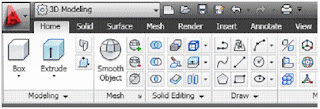
AutoCAD has custom workspaces. Out of the box, AutoCAD 2011 comes with four of them; Classic, 2D Drafting and Annotation, 3D Basics, and 3D Modeling. The 3D Basics workspace provides you with, well, the basic tools you need to create 3D models. The 3D Modeling workspace gives you access to all of the 3D tools and visualization features in AutoCAD.


Figure 1 (Click to enlarge): The 3D Modeling workspace contains every 3D modeling and visualization tool available in AutoCAD.

3D object snaps

Object snaps have been available in AutoCAD for a long time. Now there are 3D object snaps. They work the same way, but you can toggle them on and off just as you could "regular" Osnaps. These new snaps have their own settings, status bar icon toggle, and are in the shift-right-click shortcut menu. When activated (by clicking on the 3D Osnap icon in the status bar) you can snap to a vertex, midpoint on an edge, center of a face, knot, perpendicular, and to the nearest face. The F4 key toggles 3D Osnaps on/off. Type 3DOSNAP to get to the settings window. Here you can check on/off which 3D Osnap to have active.

Solid modeling tools

These tools arent new, just improved. These tools include Extrude, Loft, Revolve, and Sweep. Youve used these tools many times, but now you can select an edge or sub-object as a profile or curve in order to create a new surface. You arent limited to using planar curves anymore. This new feature gives you much more flexibility when creating 3D objects.
Solid editing has new finishing tools. In the Solid tab on the ribbon you will find the new Fillet Edge and Chamfer Edge commands. They work just like their 2D cousins, but in three dimensions. They also have a preview feature that helps you make sure you have things set right before you edit the 3D model you are trying to fillet or chamfer.

Figure 2 (Click to enlarge): Use the Fillet Edge or Chamfer Edge commands to modify 3D objects.

Surface Modeling

AutoCAD has had 3D solids for some time. AutoCAD 2010 gave us mesh objects. AutoCAD 2011 gives us two different types of surfaces: Procedural Surfaces and NURBS. Procedural surfaces are associative and retain history. NURBS (non-uniform rational b-spline) are not associative, have no history, but they do have control vertices. These vertices give you the ability to sculpt or shape your surfaces more freely.

Surface creation tools

So much has been added to surfaces in AutoCAD 2011. You can create surfaces in different ways and you can also create three different analytic surface types: Blend, Patch, and Network. A Blend Surface creates a smooth transition between existing surfaces. It fills in the gaps, and you have choices as to how this is done. While creating a blend surface, a grip edit opens up giving you a choice between position, tangent, and curvature. Each choice makes the blend different in ways that will be obvious.

The Patch Surface tool enables you to "patch" an open, closed-edge object. It creates a new patch surface for any bounding edge that is a closed loop.

The Network Surface tool gives you the ability to create a surface through a set of curves in the U and V directions. It works similarly to the Loft command, but is more flexible. You can even choose a selection of curves that are not connected to each other. If you define a network surface with edges from existing surfaces you will get additional grips that enable you to control the continuity between the new surface and the old surfaces.

The SURFOFFSET command (also found in the Create panel of the Surface tab in the ribbon) will let you offset a surface. It creates a new surface that is "parallel" to the old surface at a set distance.

Surface editing tools

AutoCAD 2011 gives us many new tools that allow us to edit these new surfaces we can create. They will be familiar to you. Use the SURFFILLET command to fillet between the edges of two surfaces. I told you it would be familiar! There is also a Trim tool (these can both be found in the Edit panel on the ribbon). The Trim tool will cut a hole in a surface based on the shape of another object. Draw the trimming edge shape, start the Trim tool, pick your trimming edge and then your shape (just like the trim command) and it will cut out a hole in your surface that is shaped like your trimming object. If you made a mistake, you can use the UNTRIM command. The Extend tool allows you to extend a surfaces edge to another object. The Sculpt tool (SURFSCULPT) lets you create a new object based on the enclosed volume of multiple intersecting surfaces. The area must be enclosed for it to work.

Analysis tools

AutoCAD now has a few analysis tools that can help you understand your objects continuity between different surfaces that make up a shape. They are found in the Analysis panel in the Surface tab on the ribbon. The Zebra tool lets you look at a surface continuity by projecting parallel lines on the surface. The Curvature tool displays a color gradient on the surface letting you know where there are high (and low) area of curvature. The Draft tool also displays a gradient color on the surface that enables you to figure out if a model has enough draft between a part and its mold. The displays for these tools are controlled with the Analysis Options dialog box. Get there in the Analysis panel.


Figure 3 (Click to enlarge): The analysis tools in AutoCAD can give you a different visual display of your surfaces.

Mesh Modeling

The Mesh Modeling tools have gotten a bit better in AutoCAD 2011. They provide a more flexibility and give more control. Visit the Mesh tab for these new tools. Use the Merge Mesh tool to merge two or more adjacent faces into a single face. This will make for one larger face and could make things easier to edit. If you want to extrude a face, for example, but the area is currently three or four faces large, merge them into one and have at it.

The Close Hole tool will fill in the gaps between mesh objects by selecting the edges of a surrounding mesh object. A new surface will fill the empty space between the selected edges.
The Collapse Face or Edge tool lets you force vertices of a mesh face to converge at the center of a selected face, or edge. The Spin Triangle Face tool will change the shape of a face by rotating the edge of a triangular mesh face.

Conclusion

AutoCAD 2011 has added many new tools and features to its 3D arsenal. AutoCAD users can now create 3D solids, meshes, and surfaces. Many editing tools have been added as well as creation tools. AutoCAD’s 3D abilities have grown tremendously over the past few releases.

This wraps up our look at the new features in AutoCAD 2011. It was a long journey but this release had many new features. I could have stretched it out even further, but this release is half over! It wont be long before we start talking about the next release of AutoCAD I’m sure.

(Reprinted with permission from Autodesk User Group International - AUGI)
Read More..

Chagning Display Colors in AutoCAD


We all see things differently. Its a matter of taste. As with all tings AutoCAD, all things are customizable. So are the colors of nearly each item in AutoCAD. One of the most common questions I receive here at CAD-a-Blog about AutoCAD is "How do I change the background color?" Its a good question. It is one of the first things I do when I load AutoCAD on a machine. I cant stand the white background.

To adjust the colors in AutoCAD, open the OPTIONS window. Type in OP at the command line to start the OPTIONS window.

Go the DISPLAY tab.

On the left of the window, near the center, there is a button with text in it labeled COLORS. Click it to edit the colors of AutoCAD.

This will open the color settings.

On the left side of that window, under the CONTEXT area, click the SHEET/LAYOUT option. This will bring up (on the right) the options that you can change for the layout/paper space area.

In the center of the window is the INTERFACE ELEMENT option. Pick the UNIFORMED BACKGROUND. That is the background. On the right, top, under COLOR, (obviously I guess) is where you pick the color.


Once you find the right button to push, and where Autodesk has hidden it!!! its a rather easy thing to change.

Happy cadding.
Read More..

Single Row Single Column Marquees in Photoshop

You must be familiar with the Rectangular and the Elliptical Marquees. There are two other Marquee Tools below them -- Single Row and Single Column Marquees. These are little used. This is a tutorial on their use. You can create a special effect with them.
This is the effect you can create.
This is the original free stock image.
You will find the tutorial here
Other photoshop tutorials are here


Read More..

Blog Archive

Powered by Blogger.