IMSI/Design announced today the release of their latest mobile app, TurboReview. IMSI also makes TurboViewer CAD file viewer app for iOS and Android as well as TurboCAD, a full-fledged 3D and 2D CAD modeling platform.
TurboReview is a mobile app available on iOS only. An Android version is currently in development and will eventually be available. IMSI did this with their other mobile apps, iOS first, then Android.
Overview
TurboReview is a mobile app that allows users to review and mark up a plethora of CAD and document related file types. IMSI claims (I haven’t fact checked it to be certain but I think they are correct) that TurboReview is the first 2d and 3D mobile mark-up solution for the AEC world to support 3D PDF (U3D).
Main Specs
TurboReview is a fast, mobile app (only for iOS at the time of this writing) that allows for 2D and 3D markups.
Mark Up Features:
- 2D and 3D environment
- Line, Circle, Rectangle, Revision Cloud, Highlighter, Text, Leaders, Dimensions
- Inquiry Tools-Dimensions, Angle, Perimeter, Area
- Always Facing Text/Markups
Viewing Features:
- Layer Manager
- Layout Support
- Screen Shot Capture Tool
- Multi-Touch Navigation: Pan, Zoom, 3D Orbit
- Visual Styles (wireframe, hidden, x-ray, gray scale, shaded, and more)
- Lighting controls
File Sharing Options:
- File Management, Sub-folders, Cut/Copy/Paste/Rename
- Email marked up files
- Support for 15 Languages
File Type Support:
DWG, DXF, DWF, PDF, 3D PDF (U3D), TCW, 2CD, 3DM, 3DS, ASAT, CGM, DCD, DGN, EPS, FCW, IGS, OBJ, PLT, SAT, SKP, STEP, STL, STP, and WRZ
The Good
TurboReview is very fast and very easy to use. It only took me a few seconds to figure everything out. It works very well in a touch interface environment. I liked the fact that it can access so many different file types, even 3D PDF files. That’s a big deal. Not everyone is using AutoCAD and not everyone is using 3D DWF files to share content.
The Bad
Getting the files from my company server to my iPad was frustrating. But that’s an iPad issue not a TuurboReview issue. Once I emailed myself the file or put them in Dropbox it was extremely easy to access the files in TurboReview. Marking up the file in 3D was easy, but placing dimensions was tricky. The extension lines on the dimensions “snap” to endpoints, but many times when I rotated my view I found that they didn’t actually snap and were dimension off in open space. To get around this issue I set the view to a proper orthogonal projection, which is easy enough to do. I dimensioned the view, then rotated and everything was as it should be. I then dimensioned the same linework while in a 3D iso view and the dimensions snapped properly. It was if it needed to be set first. Just be careful when dimensioning in 3D. The other and perhaps the biggest issue was the price. I think it is a little high.
Conclusion
IMSI’s TurboReview is a great mobile app for viewing and marking up CAD files (and 3D PDF files.) It is fast and easy to use. The interface is simple and direct and working with 3D files is a breeze (just be careful using dimensions). The price is high, maybe too high in my opinion, especially with other CAD file viewers and mark up apps being free or nearly free. If you work with a wide variety of file types or with 3D files then this review app is for you. If you are going to get, get it now before the price goes up to $49.99 (USD).
Price
TurboReview is available now in the Apple App Store. TurboReview v1 for iPad has a limited-time introductory price of $34.99 (USD) with a regular price of $49.99 (USD) and is available from the Apple® App Store®. No word on how long this introductory price will be available, but if you want this app I suggest you get it now at the lower price. You can check out
www.TurboApps.com for more pricing information on all of IMSI’s apps.
Disclosure
IMSI/Design supplied me with a free copy of TurboReview for this post.
Other Products From IMSI/Design
TurboViewerTurboViewer XTurboViewer ProPics
These Pictures are all screen shots from the TurboReview app running on an iPad 2 while I was testing the program.
 |
| The opening Interface. |
 |
| Switching from Mark Up Mode to Inquiry Mode |
 |
| Viewing a 3D Model .DWG file |
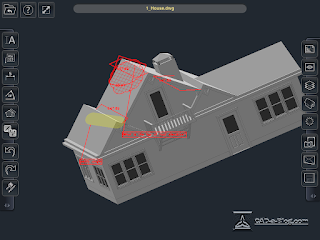 |
| Rotated Marked Up Model after the Mark Up |
 |
| Original Mark Ups in a 3D view |
 |
| Properties settings window |


